Bootstrap 5 + FontAwesome 6 通知组件美化详解(附代码示例)
在现代Web应用中,通知组件是用户交互体验中不可或缺的一环。无论是操作成功提示、错误警告,还是系统消息推送,一个设计精良的通知组件都能显著提升产品的专业感和用户体验。本文将详细介绍如何基于Bootstrap 5的Alert组件,结合FontAwesome 6图标库,打造美观、功能完整的通知系统。
一、为什么选择Bootstrap 5 + FontAwesome 6?
Bootstrap 5 是目前最流行的前端UI框架之一,其Alert组件提供了开箱即用的通知样式,支持多种颜色主题、可关闭功能以及平滑的淡入淡出动画。FontAwesome 6 则是全球最受欢迎的图标库,提供了数千个高质量图标,能够极大增强通知的视觉表现力。
两者结合的优势在于:
快速开发:Bootstrap提供结构,FontAwesome提供图标,无需从零设计
一致性:遵循Bootstrap的设计规范,确保与其他UI组件风格统一
可维护性:基于成熟的开源库,文档完善,社区活跃
二、环境搭建
首先,在HTML文档中引入Bootstrap 5和FontAwesome 6的CDN资源:
<!DOCTYPE html>
<html lang="zh-CN">
<head>
  <meta charset="UTF-8">
  <meta name="viewport" content="width=device-width, initial-scale=1.0">
  <title>Bootstrap 5 + FontAwesome 6 通知组件</title>

  <!-- Bootstrap 5 CSS -->
  <link href="https://cdn.jsdelivr.net/npm/bootstrap@5.3.3/dist/css/bootstrap.min.css" rel="stylesheet">

  <!-- FontAwesome 6 CSS (免费版) -->
  <link rel="stylesheet" href="https://cdnjs.cloudflare.com/ajax/libs/font-awesome/6.5.1/css/all.min.css">

  <!-- 自定义样式 -->
  <style>
    /* 后续添加自定义样式 */
  </style>
</head>
<body>
  <!-- 通知组件将放置于此 -->

  <!-- Bootstrap 5 JS Bundle (包含Popper) -->
  <script src="https://cdn.jsdelivr.net/npm/bootstrap@5.3.3/dist/js/bootstrap.bundle.min.js"></script>
</body>
</html>
注意:Bootstrap 5的Alert插件依赖Transition插件实现动画效果,
bootstrap.bundle.min.js已包含所有必要依赖。
三、Bootstrap 5 Alert基础用法
3.1 基本警告框
Bootstrap 5提供了八种上下文颜色类,对应不同的通知类型:
<!-- 成功提示 -->
<div class="alert alert-success">
  <strong>成功!</strong> 操作已完成。
</div>

<!-- 信息提示 -->
<div class="alert alert-info">
  <strong>提示!</strong> 这是一条普通信息。
</div>

<!-- 警告提示 -->
<div class="alert alert-warning">
  <strong>警告!</strong> 请注意检查您的输入。
</div>

<!-- 危险/错误提示 -->
<div class="alert alert-danger">
  <strong>错误!</strong> 操作失败,请重试。
</div>

<!-- 主要提示 -->
<div class="alert alert-primary">
  <strong>主要</strong> 这是一条主要通知。
</div>

<!-- 次要提示 -->
<div class="alert alert-secondary">
  <strong>次要</strong> 这是一条次要通知。
</div>

<!-- 亮色提示 -->
<div class="alert alert-light">
  <strong>亮色</strong> 这是一条亮色通知。
</div>

<!-- 暗色提示 -->
<div class="alert alert-dark">
  <strong>暗色</strong> 这是一条暗色通知。
</div>
3.2 可关闭的警告框
通过添加 alert-dismissible 类和关闭按钮,用户可手动关闭通知:
<div class="alert alert-success alert-dismissible fade show">
  <button type="button" class="btn-close" data-bs-dismiss="alert"></button>
  <strong>成功!</strong> 这是一条可关闭的成功通知。
</div>
关键属性说明:
alert-dismissible:启用可关闭功能btn-close:关闭按钮样式data-bs-dismiss="alert":触发关闭行为的属性fade show:启用淡入淡出动画效果
3.3 带链接的警告框
使用 alert-link 类可使链接颜色与警告框主题匹配:
<div class="alert alert-info">
  <strong>提示!</strong> 请查看 <a href="#" class="alert-link">详细文档</a> 了解更多。
</div>
四、使用FontAwesome 6美化通知组件
Bootstrap 5的Alert组件默认不包含图标,但通过FontAwesome 6可以轻松为每种通知类型添加对应的视觉图标。
4.1 基础图标集成
最直接的方式是在Alert内容中使用 <i> 标签插入图标:
<div class="alert alert-success">
  <i class="fas fa-check-circle"></i>
  <strong>成功!</strong> 操作已完成。
</div>

<div class="alert alert-danger">
  <i class="fas fa-exclamation-circle"></i>
  <strong>错误!</strong> 操作失败,请重试。
</div>

<div class="alert alert-warning">
  <i class="fas fa-triangle-exclamation"></i>
  <strong>警告!</strong> 请注意检查您的输入。
</div>

<div class="alert alert-info">
  <i class="fas fa-circle-info"></i>
  <strong>提示!</strong> 这是一条普通信息。
</div>
4.2 图标与文字对齐优化
由于Alert默认的 padding 和 line-height 是针对纯文本设计的,添加图标后可能出现文字换行或上下偏移的问题。可以通过Flexbox布局进行优化:
<div class="alert alert-success d-flex align-items-center">
  <i class="fas fa-check-circle me-2"></i>
  <div>
    <strong>成功!</strong> 操作已完成。
  </div>
</div>
关键类说明:
d-flex:启用Flexbox布局align-items-center:垂直居中对齐me-2:图标右侧添加间距(margin-end)
4.3 推荐的通知图标映射
| 通知类型 | Bootstrap类 | FontAwesome 6图标 | 图标类名 |
|---|---|---|---|
| 成功 | alert-success | 勾选圆圈 | fa-check-circle |
| 信息 | alert-info | 信息圆圈 | fa-circle-info |
| 警告 | alert-warning | 警告三角形 | fa-triangle-exclamation |
| 错误 | alert-danger | 错误圆圈 | fa-circle-exclamation |
| 主要 | alert-primary | 星号 | fa-star |
| 次要 | alert-secondary | 齿轮 | fa-gear |
五、通知组件高级美化
5.1 带图标边栏的通知
通过自定义CSS为通知添加彩色左边栏,增强视觉层次感:
<style>
.alert-icon-sidebar {
  border-left: 5px solid rgba(0,0,0,0.2);
  padding-left: 1rem;
}
.alert-success.alert-icon-sidebar {
  border-left-color: #198754;
}
.alert-danger.alert-icon-sidebar {
  border-left-color: #dc3545;
}
.alert-warning.alert-icon-sidebar {
  border-left-color: #ffc107;
}
.alert-info.alert-icon-sidebar {
  border-left-color: #0dcaf0;
}
</style>

<div class="alert alert-success alert-icon-sidebar d-flex align-items-center">
  <i class="fas fa-check-circle fa-2x me-3 text-success"></i>
  <div>
    <h5 class="alert-heading">操作成功</h5>
    <p class="mb-0">您的数据已成功保存。</p>
  </div>
</div>
5.2 带标题和内容的通知
使用 alert-heading 类可创建结构更丰富的通知:
<div class="alert alert-primary d-flex align-items-start">
  <i class="fas fa-bell fa-2x me-3 text-primary"></i>
  <div>
    <h4 class="alert-heading">新消息通知</h4>
    <p>您有3条未读消息,请及时查看。</p>
    <hr>
    <p class="mb-0">
      <a href="#" class="alert-link">查看全部消息</a>
    </p>
  </div>
</div>
5.3 圆角与阴影美化
通过Bootstrap的工具类快速调整样式:
<div class="alert alert-success d-flex align-items-center rounded-4 shadow-sm">
  <i class="fas fa-check-circle me-2"></i>
  <div>
    <strong>成功!</strong> 操作已完成。
  </div>
  <button type="button" class="btn-close ms-auto" data-bs-dismiss="alert"></button>
</div>
关键类说明:
rounded-4:更大的圆角shadow-sm:轻微阴影效果ms-auto:关闭按钮右对齐
5.4 自定义颜色主题
如果需要更丰富的颜色方案,可以自定义CSS覆盖Bootstrap默认样式:
<style>
/* 自定义通知类型 */
.alert-purple {
  background-color: #f3e8ff;
  border-color: #d8b4fe;
  color: #6b21a8;
}
.alert-purple .alert-link {
  color: #4c1d95;
}
</style>

<div class="alert alert-purple d-flex align-items-center">
  <i class="fas fa-gem me-2"></i>
  <div>
    <strong>会员专属!</strong> 您已获得专属优惠。
  </div>
</div>
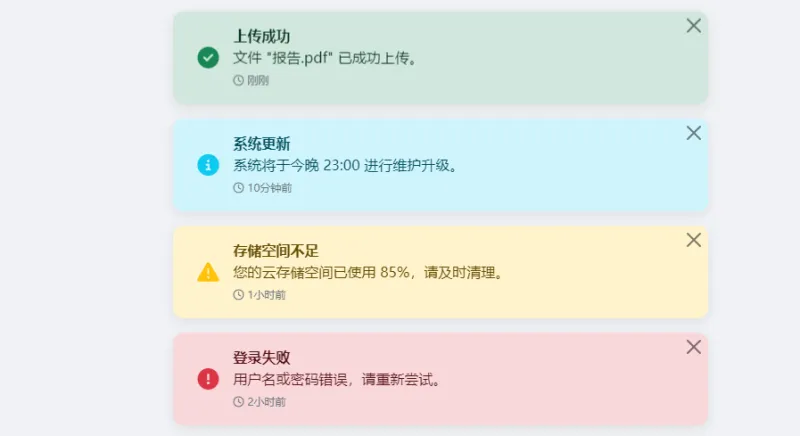
六、完整示例:现代化的通知中心
以下是一个完整的通知中心示例,集成了多种通知类型和FontAwesome 6图标:
<!DOCTYPE html>
<html lang="zh-CN">
<head>
  <meta charset="UTF-8">
  <meta name="viewport" content="width=device-width, initial-scale=1.0">
  <title>福娃工具网通知中心 - Bootstrap 5 + FontAwesome 6</title>
  <link href="https://cdn.jsdelivr.net/npm/bootstrap@5.3.3/dist/css/bootstrap.min.css" rel="stylesheet">
  <link rel="stylesheet" href="https://cdnjs.cloudflare.com/ajax/libs/font-awesome/6.5.1/css/all.min.css">
  <style>
    body {
      background: #f0f2f5;
      padding: 2rem;
    }
    .notification-container {
      max-width: 600px;
      margin: 0 auto;
    }
    .alert-modern {
      border: none;
      border-radius: 12px;
      padding: 1rem 1.25rem;
      box-shadow: 0 4px 12px rgba(0,0,0,0.08);
      transition: all 0.3s ease;
    }
    .alert-modern:hover {
      transform: translateY(-2px);
      box-shadow: 0 6px 20px rgba(0,0,0,0.12);
    }
    .alert-modern .alert-icon {
      font-size: 1.5rem;
      width: 2.5rem;
      text-align: center;
    }
    .alert-modern .btn-close {
      padding: 0.5rem;
    }
    /* 通知时间戳样式 */
    .notification-time {
      font-size: 0.75rem;
      color: #6c757d;
    }
  </style>
</head>
<body>

<div class="notification-container">
  <h3 class="mb-4 d-flex align-items-center">
    <i class="fas fa-bell me-2"></i>
    通知中心
    <span class="badge bg-danger ms-2 rounded-pill">5</span>
  </h3>

  <!-- 成功通知 -->
  <div class="alert alert-success alert-dismissible fade show alert-modern d-flex align-items-center mb-3">
    <i class="fas fa-check-circle alert-icon text-success me-2"></i>
    <div class="flex-grow-1">
      <strong>上传成功</strong>
      <p class="mb-0">文件 "报告.pdf" 已成功上传。</p>
      <span class="notification-time"><i class="far fa-clock me-1"></i>刚刚</span>
    </div>
    <button type="button" class="btn-close" data-bs-dismiss="alert"></button>
  </div>

  <!-- 信息通知 -->
  <div class="alert alert-info alert-dismissible fade show alert-modern d-flex align-items-center mb-3">
    <i class="fas fa-circle-info alert-icon text-info me-2"></i>
    <div class="flex-grow-1">
      <strong>系统更新</strong>
      <p class="mb-0">www.fuwa.org系统将于今晚 23:00 进行维护升级。</p>
      <span class="notification-time"><i class="far fa-clock me-1"></i>10分钟前</span>
    </div>
    <button type="button" class="btn-close" data-bs-dismiss="alert"></button>
  </div>

  <!-- 警告通知 -->
  <div class="alert alert-warning alert-dismissible fade show alert-modern d-flex align-items-center mb-3">
    <i class="fas fa-triangle-exclamation alert-icon text-warning me-2"></i>
    <div class="flex-grow-1">
      <strong>存储空间不足</strong>
      <p class="mb-0">您的云存储空间已使用 85%,请及时清理。</p>
      <span class="notification-time"><i class="far fa-clock me-1"></i>1小时前</span>
    </div>
    <button type="button" class="btn-close" data-bs-dismiss="alert"></button>
  </div>

  <!-- 错误通知 -->
  <div class="alert alert-danger alert-dismissible fade show alert-modern d-flex align-items-center mb-3">
    <i class="fas fa-circle-exclamation alert-icon text-danger me-2"></i>
    <div class="flex-grow-1">
      <strong>登录失败</strong>
      <p class="mb-0">用户名或密码错误,请重新尝试。</p>
      <span class="notification-time"><i class="far fa-clock me-1"></i>2小时前</span>
    </div>
    <button type="button" class="btn-close" data-bs-dismiss="alert"></button>
  </div>

  <!-- 主要通知 - 带操作按钮 -->
  <div class="alert alert-primary alert-dismissible fade show alert-modern d-flex align-items-start mb-3">
    <i class="fas fa-gift alert-icon text-primary me-2"></i>
    <div class="flex-grow-1">
      <strong>限时优惠</strong>
      <p class="mb-2">新用户注册即送 100 元优惠券!</p>
      <div>
        <a href="https://www.fuwa.org" class="btn btn-primary btn-sm">立即领取</a>
        <a href="https://www.fuwa.org" class="btn btn-outline-primary btn-sm">了解更多</a>
      </div>
      <span class="notification-time mt-2 d-block"><i class="far fa-clock me-1"></i>3小时前</span>
    </div>
    <button type="button" class="btn-close" data-bs-dismiss="alert"></button>
  </div>
</div>

<script src="https://cdn.jsdelivr.net/npm/bootstrap@5.3.3/dist/js/bootstrap.bundle.min.js"></script>
</body>
</html>
七、进阶:使用Toast实现轻量级通知
对于不需要用户手动关闭的临时通知,Bootstrap 5的Toast组件是更好的选择。结合FontAwesome 6可以创建更轻量的通知体验:
<div class="position-fixed bottom-0 end-0 p-3" style="z-index: 11">
  <div id="liveToast" class="toast" role="alert" aria-live="assertive" aria-atomic="true">
    <div class="toast-header">
      <i class="fas fa-check-circle text-success me-2"></i>
      <strong class="me-auto">操作成功</strong>
      <small>刚刚</small>
      <button type="button" class="btn-close" data-bs-dismiss="toast"></button>
    </div>
    <div class="toast-body">
      您的设置已保存成功!
    </div>
  </div>
</div>

<!-- 触发Toast的按钮 -->
<button class="btn btn-primary" onclick="showToast()">
  <i class="fas fa-bell me-2"></i>显示通知
</button>

<script>
function showToast() {
  const toast = new bootstrap.Toast(document.getElementById('liveToast'), {
    delay: 3000 // 3秒后自动消失
  });
  toast.show();
}
</script>
八、最佳实践与注意事项
8.1 可访问性
为图标添加 aria-hidden="true" 属性,避免屏幕阅读器朗读无意义的图标字符:
<i class="fas fa-check-circle" aria-hidden="true"></i>
8.2 合理使用通知类型
Alert(警告框) :适合需要用户确认的重要信息,会停留在屏幕上直到被关闭
Toast(吐司通知) :适合轻量级反馈,自动消失,不打断用户操作
8.3 性能优化
使用CDN加载Bootstrap和FontAwesome,利用浏览器缓存
按需引入FontAwesome图标,而非全量加载
对于生产环境,考虑使用SVG图标替代Web Fonts以减少HTTP请求
8.4 响应式设计
Bootstrap 5的Alert组件默认支持响应式,但在移动端应注意:
避免通知内容过长
适当减小内边距和字体大小
确保关闭按钮在触屏设备上易于点击
结语
通过Bootstrap 5的Alert组件与FontAwesome 6图标库的结合,我们可以在极短的时间内构建出功能完善、视觉优美的通知系统。从基础的单色警告框到带图标、带操作按钮的现代化通知中心,本文提供的代码示例涵盖了各种常见场景。
Bootstrap 5提供了坚实的结构基础,FontAwesome 6则赋予了通知组件丰富的视觉表现力。两者相辅相成,让开发者能够专注于业务逻辑,而无需在UI细节上花费过多精力。希望本文能帮助您在项目中快速落地高质量的通知组件。
版权及免责申明:本文由@fuwa原创发布。该文章观点仅代表作者本人,不代表本站立场。本站不承担任何相关法律责任。
如若转载,请注明出处:https://www.fuwa.org/tutorials/bootstrap-fontawesome-notifications.html